
Version 2026.04, April 2026
New Features
Akselos Modeler Version 2026.04 introduces these user-focused features:
Description
Solver
1. Acceleration Load in Harmonic Analysis: Two new load types specific to harmonic analysis can be defined: Harmonic Material Volume Load, and Harmonic Rotary Acceleration. They have the same parameters as the equivalent “non-harmonic” load types, plus an additional “phase angle” parameter. These can be used to define a harmonic acceleration load (respectively translational and rotational).
Solver
2. Improved Support for RB-FEA with Temperature Variation: Improvements were made to the RB-FEA solver for temperature variation to significantly reduce the training time, and hence make it more efficient to run RB-FEA with models with many different temperature profiles.
Akselos Modeler and Post-processing
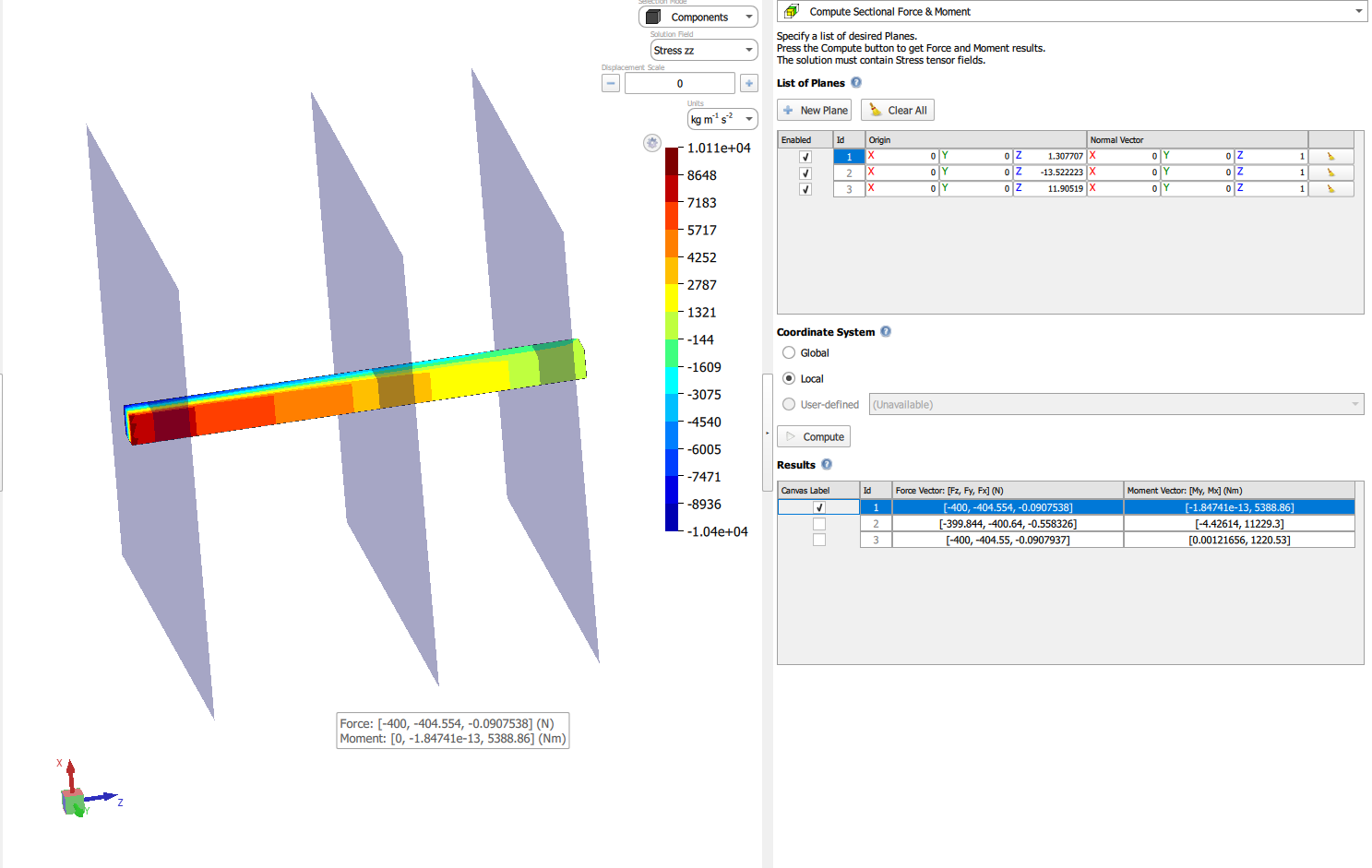
3. Cross-Section Force Calculator: Instantly compute bending moments and axial forces on any sideset or sliced cross-section within the Inspect Solution module. This saves time by eliminating manual coordinate transformations and surface integrations. Just select your surface, and the tool automatically extracts these forces for you.
Akselos Modeler and Post-processing
4. Mesh Flattening for Solid Components: You can now assign cross-sections directly from the library to subdomains via a dedicated interface, simplifying your model setup. This eliminates the need to go through each subdomain individually to assign a cross-section.
Bug Fixes & Improvements
Akselos Modeler Version 2026.04 contains the following bug fixes and improvements:
Description
Solver
Improved post-processing performance, including optimizations to stress computation and component solution I/O, resulting in noticeably faster overall workflow.
And other additional bug fixes and improvements.
Known Issues & Limitations
Visit our website to learn about all known software issues and limitations.
KNOWN ISSUES AND LIMITATIONSHow to Upgrade (for Innovate Users)
Easily upgrade your Akselos Modeler by following these steps:
- Download the latest version of Akselos Modeler from the Download Modeler link on dashboard.akselos.com, which takes you here.
- Installation instructions for Akselos Modeler are on the same page; see here.
Request a Demo
Would you like to see our upgrade in action? Book a demonstration from our support team.
BOOK A DEMOShare your Feedback
We value your input. If you have any comments, questions, or suggestions about the Akselos Modeler Version 2026.04, please don’t hesitate to contact our team.
CONTACT US NOW